

Table of Contents
- The Short Answer
- How Spear Phishing Actually Works
- Why Your Filters Can’t Stop Them
- Real Attacks We’ve Seen in the Wild
- What Actually Stops Spear Phishing
- What Most Companies Get Wrong
- Key Takeaways
- Frequently Asked Questions
The Short Answer
Spear phishing is a targeted email attack in which a hacker researches a specific individual or organization, then crafts a personalized message designed to steal credentials, transfer funds, or install malware. Unlike mass phishing campaigns that blast thousands of generic emails, spear phishing messages are individually tailored. And that’s exactly why your spam filter doesn’t catch them.
Last March, a Series B fintech startup in Bangalore lost ₹2.3 crore because their senior backend engineer clicked an email that looked like it came from the CTO. The attacker had spent twelve minutes on LinkedIn. The email address was off by one letter. And the “deployment approval” link looked identical to their actual AWS console login.
That’s spear phishing. It’s not a zero-day exploit or some nation-state toolkit. It’s reconnaissance plus social engineering plus one careless click. In my ten years building systems at Paytm and consulting for fintechs across India, I’ve seen it bypass every technical control that companies overpay for.
Here’s what actually works to stop it—and why most organizations waste money on the wrong defenses.
How Spear Phishing Actually Works
Most people picture hackers in hoodies typing furiously at midnight. The reality is far more mundane—and more dangerous. A typical spear phishing campaign doesn’t start with code. It starts with a Google search and a LinkedIn profile.
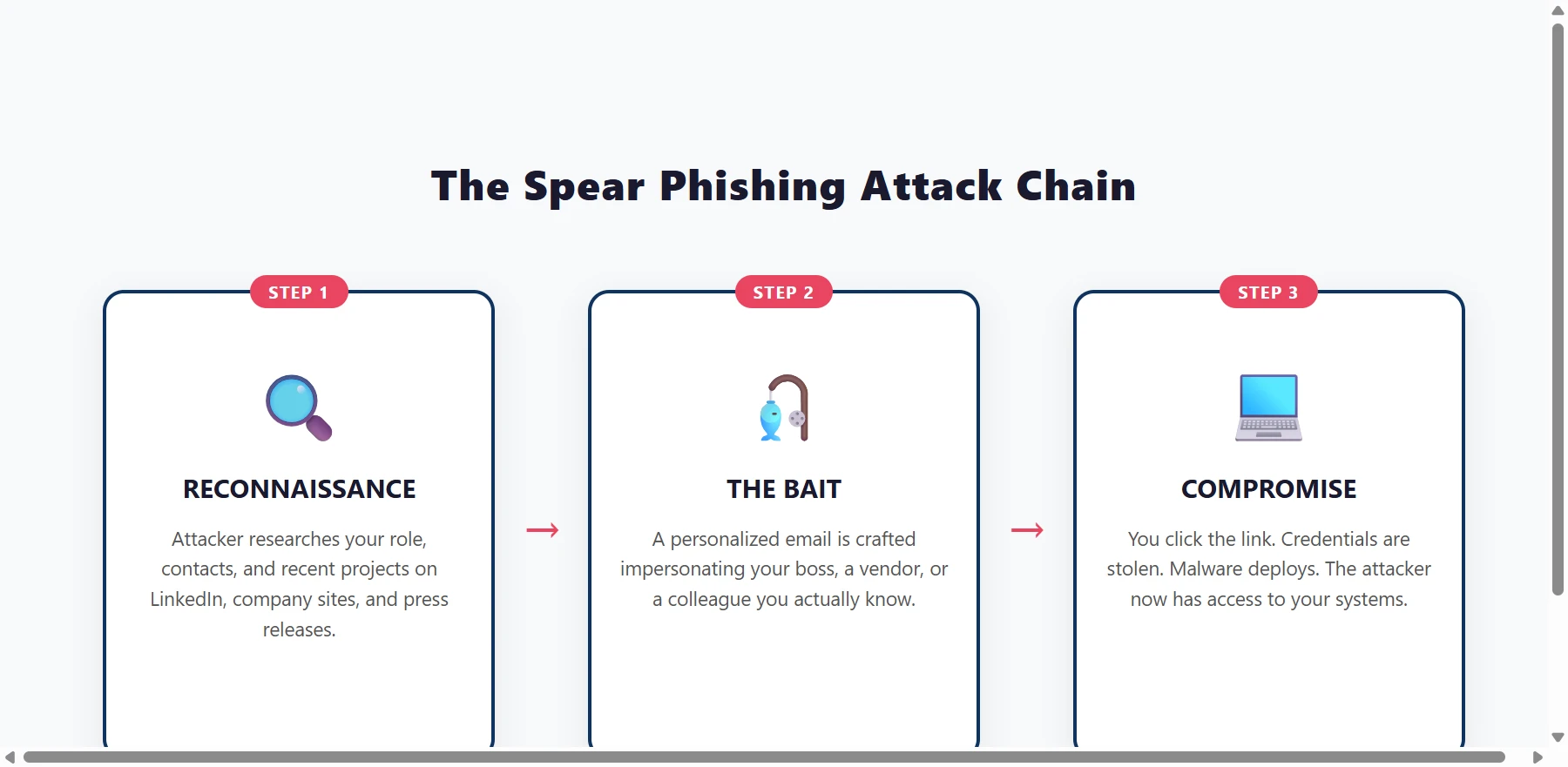
Step 1: Open-Source Reconnaissance
The attacker picks a target. Maybe it’s a company. Maybe it’s one person inside that company. Then they dig.
LinkedIn is the attacker’s best friend. They’ll map out who reports to whom, who just joined the company, who handles vendor payments, and who’s active on GitHub. Company websites list team pages with exact titles. Press releases announce new funding, new partnerships, and new executives—perfect context for a fake “board presentation” or “investor due diligence” email.
It doesn’t take much. I’ve seen attackers build detailed org charts from public data in under an hour. One startup I advised had their entire leadership team’s email format guessed from a single PDF press kit that listed a contact address.
Step 2: Crafting the Bait
This is where spear phishing separates from bulk spam. The email isn’t “Dear Customer, your account is suspended.” It’s “Hey Rahul, can you approve the AWS budget for the Q2 microservices migration? Link here—need it by EOD.”
The sender name matches the CTO. The domain is one character off—maybe paytmm.com instead of paytm.com. The subject references a real project the team is running. The tone matches how the actual CTO writes.
And it works because busy people don’t inspect headers. They see a familiar name, a plausible request, and a deadline. Click.
Step 3: The Payload
Once the victim clicks, one of three things happens.
First, and most common, is credential harvesting. The link leads to a fake login page—Gmail, Office 365, AWS Console, GitHub—that looks pixel-perfect. The victim enters their password. The attacker now owns the account.
Second is malware deployment. The email contains a “contract” or “invoice” as an attachment. It might be a PDF with an embedded script, or a ZIP file with a malicious executable disguised as a spreadsheet. When opened, it installs a remote access trojan or ransomware.
Third, and nastiest, is business email compromise. There’s no payload at all. The attacker simply uses the compromised email account to send fake invoices to the finance team. One Mumbai-based SaaS company I consulted for almost wired ₹18 lakh to a fraudulent vendor because the email chain looked legitimate—because it was threaded inside the real CEO’s inbox.
Why Your Filters Can’t Stop Them
This is the part that frustrates IT teams. You’ve bought the enterprise email security stack. You’ve configured SPF, DKIM, and DMARC. You’ve deployed the AI-powered inbox scanner that promises to catch advanced threats.
And then a spear phishing email lands in the CFO’s inbox anyway.
Here’s why. Traditional email filters look for signals of bulk spam: suspicious attachments, known malicious links, poor grammar, and blacklisted sender IPs. Spear phishing emails have none of these. They come from freshly registered domains with clean reputations. They contain no malware in the initial message. The text is grammatically perfect—sometimes written by the same AI models the security vendors use.
Worse, attackers increasingly compromise legitimate accounts first. If the email actually comes from a real colleague’s Gmail or Office 365 account, your filters see a trusted sender with proper authentication. It sails through.
One security vendor I tested claimed a 99.7% catch rate. We ran a red-team exercise with five crafted spear phishing emails against their own product. Three made it to the inbox. The vendor’s explanation? “Those were highly sophisticated.” They weren’t. They took two hours to build.
Real Attacks We’ve Seen in the Wild
Theory is fine. But the best way to understand spear phishing is to look at what actually lands in inboxes.
The Fake GitHub Notification
A developer on our client’s team received an email: “Your repository access is expiring. Click here to renew your SSO session.” It looked exactly like GitHub’s actual notification emails. Same layout. Same footer. The link went to github-sso.renewal-session.com.
The developer clicked. Entered credentials. The attacker now had access to the company’s private repositories—and found AWS keys hardcoded in a config file. Total damage: about ₹40 lakh in compute resources mined before they noticed.
The BEC Invoice Scam
A manufacturing firm’s finance team received an email from the “CEO” approving an urgent wire transfer to a new vendor. The email referenced an actual deal the company was negotiating. The amount was plausible. The signature block matched.
The finance manager, eager to impress, processed the transfer. It wasn’t until the real vendor called about the unpaid invoice that anyone realized the “new banking details” were fraudulent. The money was gone.
According to the FBI’s Internet Crime Complaint Center, business email compromise cost victims over $2.9 billion globally in 2023. And that’s just what got reported.
The “Urgent” Google Docs Share
An HR lead received a Google Docs sharing notification from what appeared to be the head of recruiting. The document title was “Q2 Hiring Plan – Confidential.” When she clicked through to request access, she was prompted to “sign in to view.”
It wasn’t Google. The login page harvested her credentials, giving the attacker access to candidate databases, salary information, and internal communications. From there, they pivoted to other accounts using password resets.
What Actually Stops Spear Phishing
Now for the useful part. Most security advice is generic and useless. “Be careful clicking links” isn’t a strategy. Here’s what actually moves the needle.
Technical Controls That Work
Hardware security keys or passkeys. Not SMS two-factor authentication—that’s vulnerable to SIM swapping. I’m talking about FIDO2 keys like YubiKey. If the attacker steals your password but doesn’t have your physical key, they can’t log in. Period. At Paytm, we mandated security keys for anyone with production access. Phishing-related account takeovers dropped to zero.
Browser isolation for untrusted links. Don’t let users click links in email and reach the real internet directly. Tools like Menlo Security or Cloudflare Browser Isolation render links in a remote sandbox first. Even if the user clicks, the attacker gets nothing.
DMARC with a p=reject policy. Most companies set up SPF and DKIM and think they’re done. They’re not. DMARC tells receiving mail servers what to do when authentication fails. Set it to reject, not just monitor. It won’t stop every attack, but it eliminates the low-hanging fruit of domain spoofing. For more on building a security-first remote access setup, see our guide on how proxies and VPNs differ.
The Human Layer (Done Right)
Annual security awareness training is a checkbox exercise. Nobody remembers it when they’re rushing through emails at 4 PM on a Friday.
What works is just-in-time verification. If an email requests something unusual—sending money, sharing credentials, downloading an attachment—build a protocol that requires a second channel verification. A quick Teams message. A phone call. Anything that breaks the email-only trust chain.
One client we worked with implemented a simple rule: any invoice over ₹2 lakh requires verbal confirmation with the vendor using a known phone number, not one from the email. BEC attempts dropped to zero immediately.
This is classic social engineering—attacks that target trust, not technology. The best defense isn’t another firewall. It’s a process that assumes people will make mistakes.
What Most Companies Get Wrong
I’ve audited dozens of security programs. The same mistakes show up repeatedly.
Buying more tools instead of fixing process. Companies will spend ₹50 lakh on a shiny email gateway but won’t spend ₹2 lakh to implement a simple verification protocol for wire transfers. Technology doesn’t fix broken trust models. Before you buy another security product, audit your cybersecurity basics.
Blaming employees instead of designing for human error. Your engineers aren’t stupid. They’re busy. If your security model requires perfect vigilance from every employee, every day, forever, your security model is broken. Build systems where one click doesn’t compromise everything.
Ignoring mobile. Most executives read email on their phones first. Mobile email clients show even less security context—no hover previews for links, truncated sender addresses, smaller screens. Attackers know this and time their emails for early morning when victims are scrolling on phones.
And here’s the one that stings: assuming you’re too small to target. Startups and SMEs get hit harder than enterprises because they have fewer controls and less scrutiny. Attackers know this. You’re not flying under the radar. You’re just easier.
Key Takeaways
- Spear phishing is personal. Attackers research you first. Every email is handcrafted to match your job, your projects, and your relationships.
- Your filters aren’t enough. SPF, DKIM, and AI scanners catch bulk spam. They miss tailored messages from lookalike domains and compromised accounts.
- FIDO2 security keys work. Passwords plus SMS aren’t enough. Physical keys or passkeys stop credential theft dead. Learn more from the FIDO Alliance passkey guide.
- Process beats products. A simple “verify by phone” rule for unusual requests stops more attacks than a ₹50 lakh security stack.
- Small companies are prime targets. Attackers prefer startups and SMEs because they lack enterprise-grade controls and security teams.
Frequently Asked Questions
Q: What’s the difference between phishing and spear phishing?
A: Phishing is a broad attack sent to thousands of people with generic bait. Spear phishing targets one person or organization with a personalized message based on research. Think of it as the difference between a casting net and a sniper rifle. If you want to understand how attackers build these personalized lures, read our breakdown of social engineering tactics.
Q: Can two-factor authentication stop spear phishing?
A: SMS and app-based 2FA can be bypassed through SIM swapping or real-time phishing proxies. Hardware security keys and passkeys are the only forms of 2FA that reliably stop credential-based spear phishing.
Q: How do attackers find the information to personalize emails?
A: Almost entirely from public sources. LinkedIn, company websites, press releases, GitHub repositories, conference speaker lists, and even social media posts about work projects provide enough detail to craft believable messages.
Q: What should I do if I think I’ve clicked a spear phishing link?
A: Disconnect from the internet immediately. Change your passwords from a different device. Notify your IT or security team right away. Don’t hide it—early reporting limits the damage window significantly.
It’s Not Going Away. But You Can Fight Back.
Spear phishing isn’t going away. As long as humans handle email and attackers can scrape LinkedIn for free, it’ll remain the most reliable way into any organization.
But it’s not undefeatable. The companies that stay safe aren’t the ones with the biggest security budgets. They’re the ones that combine technical controls like FIDO2 keys with simple, enforced processes like out-of-band verification.
If you’re responsible for security at your company, start with one question: what happens if our CEO’s email gets compromised today? If the answer is “we’d be in serious trouble,” fix that first. The rest can wait.
Ayesha Khan is a Senior Software Architect and cybersecurity specialist with 10 years of experience building fintech applications and securing cloud infrastructure. She previously led platform security at Paytm and now consults for early and growth-stage tech companies across Bangalore and Singapore. At BusinessBehind, she tests security tools and protocols hands-on.
